Free sheet

Templates

Driver Mileage & Tax Tracker · Google Sheets

Your driving year,in Schedule C order.

Log your miles, pay, tips and expenses each week in one Google Sheet. For US rideshare and delivery drivers, 2026 and 2027.

See it on Etsy

One price. No monthly fee.

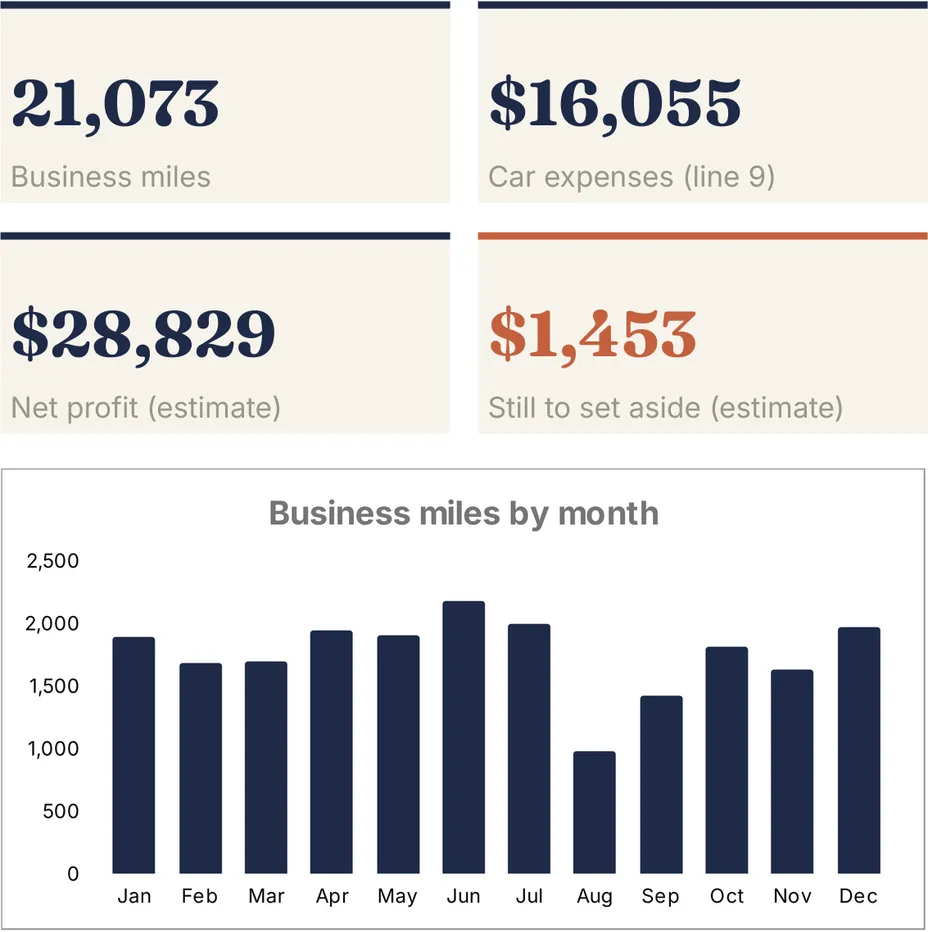
The Overview tab with example numbers - 21,073 business miles, $16,055 car expenses, $28,829 net profit (estimate), $1,453 still to set aside (estimate), and a chart of business miles by month
From the Overview tab. Example numbers.

One row for each day you drove

Business miles in one column, the drive between home and your first or last stop in another. The IRS rate is picked by date: 72.5¢ a mile through June 30, 2026, and 76¢ from July 1.

  • Do the miles from home to your first pickup count? Usually not: under IRS rules, driving from home to your first stop (and back from your last) is commuting, and commuting isn’t deductible. Some drivers count these miles once the app is on, so the sheet keeps them in their own column. Your preparer makes the call.
  • It works next to any mileage app, or with no app at all. Keep your app’s yearly summary too.
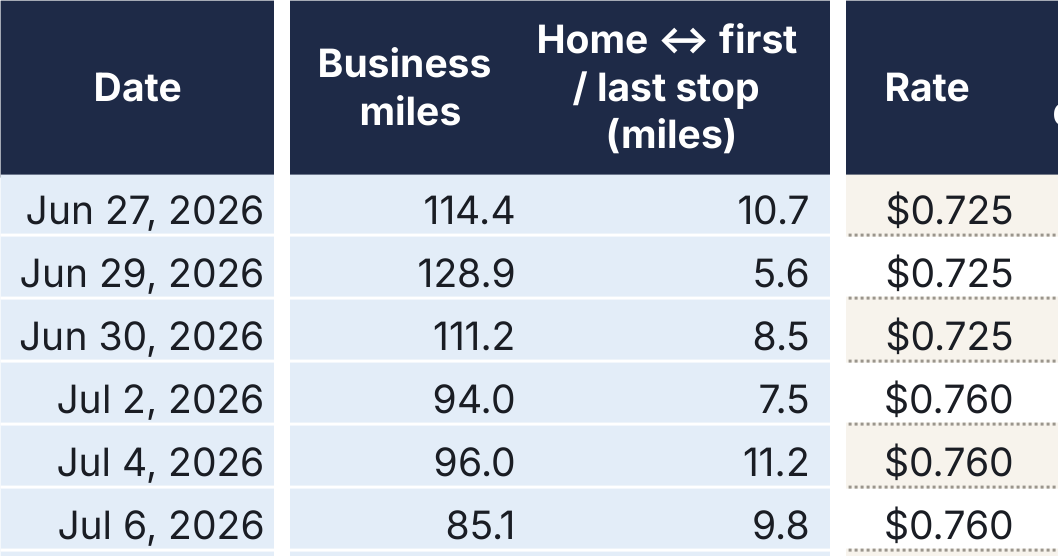
The Miles tab with example numbers - business miles, home to first or last stop miles, and the rate changing from 0.725 to 0.760 in July 2026
Example data · tap to enlarge

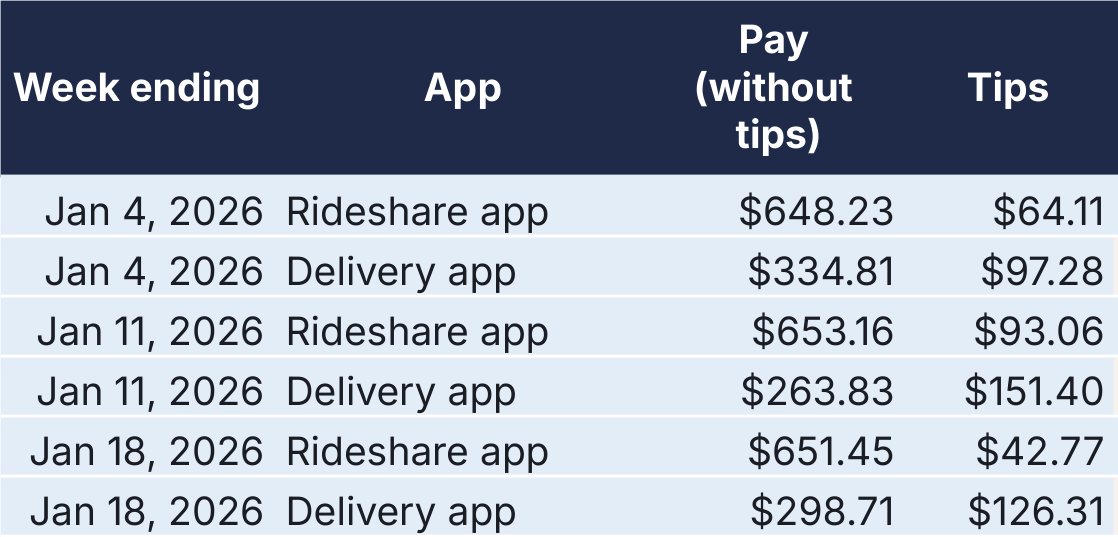
Pay and tips, per app

One row per weekly payout, per app. Tips have their own column, so your total is ready to compare with the tips box on your 2026 1099.

  • For each app you choose whether you type the amount before the app took its fees or what landed in your account, so the fees don’t get counted twice.
The Pay tab with example numbers - one row per weekly payout and app, with pay and tips in separate columns
Example data · tap to enlarge

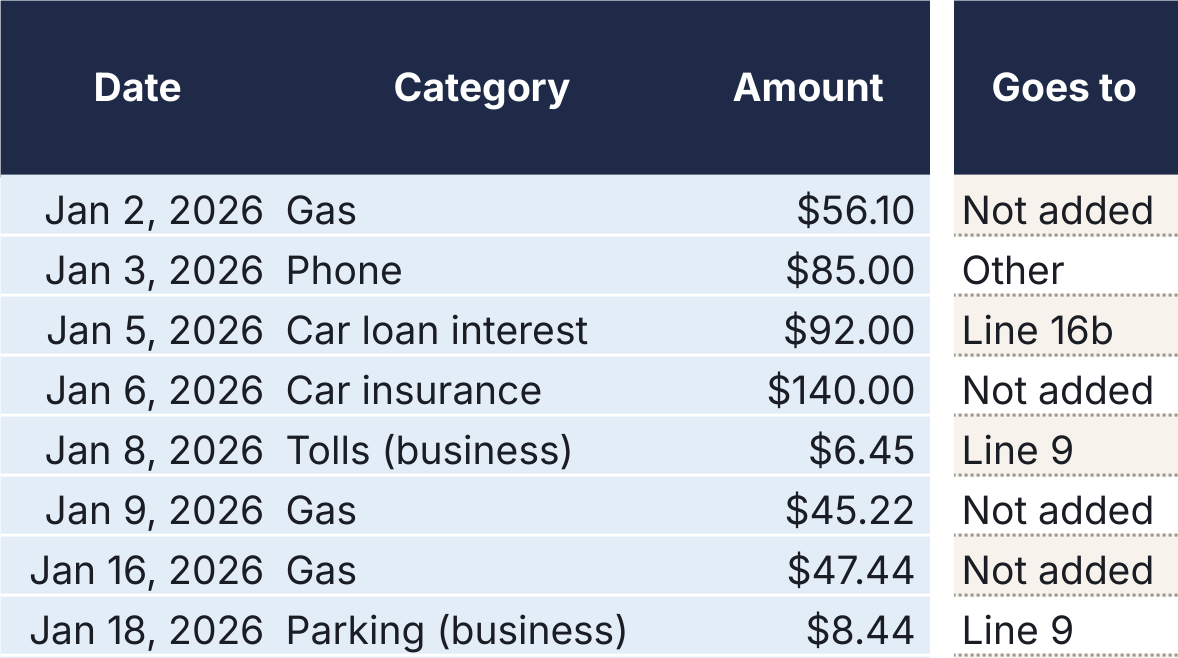
Costs, without counting them twice

Parking and tolls are added on top of the mileage amount. Gas, repairs and car insurance can be tracked too, but they stay out of the tax totals, because the mileage rate already covers them.

  • Car loan interest and car property tax by business share, the work share of your phone, supplies and other costs.
The Expenses tab with example numbers - tolls and parking go to line 9, gas and car insurance say Not added
Example data · tap to enlarge

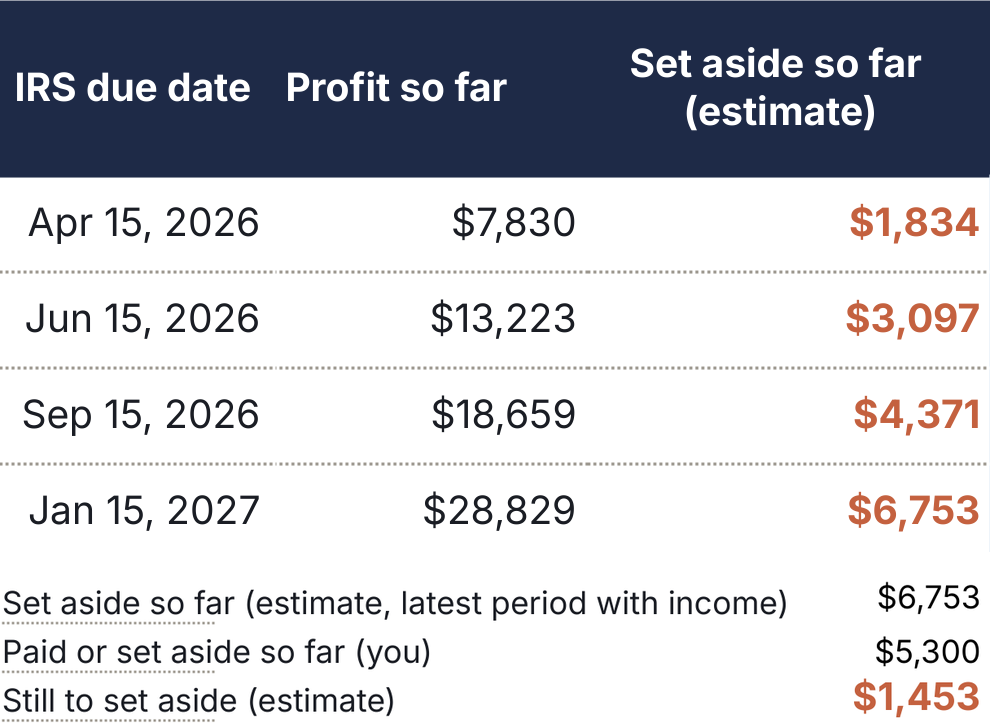
What to set aside, by IRS due date

A running estimate of federal tax to have set aside, period by period. It uses the self-employment tax plus the income tax rate you choose, shows the math, and lists what it leaves out.

The Set-aside tab with example numbers - profit and set-aside estimate by IRS due date, and $1,453 still to set aside
Example data · tap to enlarge

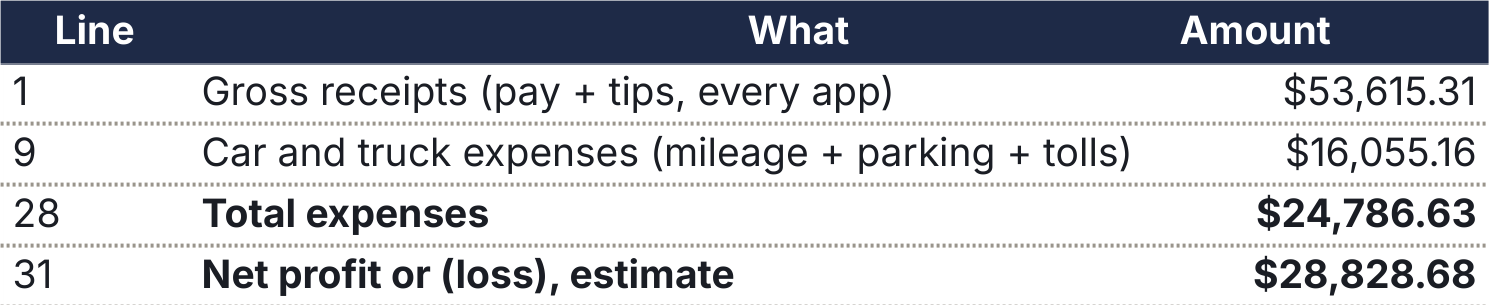
Your year in Schedule C order

From line 1 (pay + tips) to line 31, an estimate. Lines your preparer picks are marked that way.

  • Prints on one page (choose Fit to width when you print).
The Year tab with example numbers - Schedule C lines 1, 9, 28 and 31, from gross receipts $53,615.31 to net profit $28,828.68
Example data · tap to enlarge

The car questions

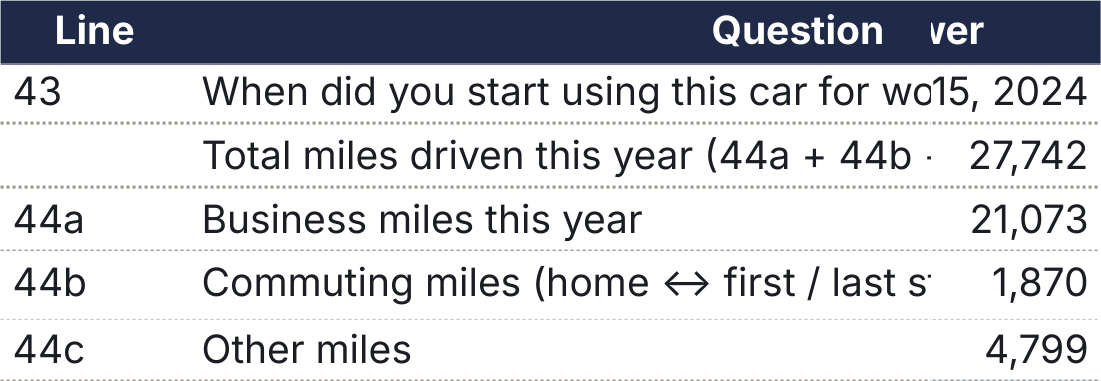
Schedule C Part IV asks about your car, lines 43 to 47b. The sheet lists them in the same order and fills in your numbers. You answer the yes/no questions.

  • Total and other miles need your odometer readings for Jan 1 and Dec 31.
Your car, Schedule C Part IV, with example numbers - lines 43 to 44c
Example data · tap to enlarge

Free: 2026 mileage deduction calculator

See it on Etsy

What’s inside

Start Here
How to get going, and what the colors mean: blue cells are yours to type in, white cells do the math.
Overview
5 summary cards and 5 charts.
Year
Schedule C order, the car questions, and how many weeks have entries.
Miles
One row for each day you drove.
Pay
One row per weekly payout, per app.
Expenses
Parking, tolls, loan interest, property tax, phone, supplies and other costs.
Set-aside
The estimate for each IRS due date.
Settings
Tax year, car start date, odometer, the income tax rate you choose, your apps and expense types.

Before you buy

  • Made for Google Sheets. It is not an Excel file, and you need a free Google account.
  • You type your numbers in yourself. It doesn’t connect to any app and doesn’t use GPS.
  • IRS standard mileage rate only. If you deduct your actual car costs, this isn’t the right sheet for you.
  • One car per copy. If you drove two cars for work, make a second copy for the second car and enter your pay in just one of them.
  • Without the Jan 1 and Dec 31 odometer readings, other miles and the business-use % stay open, and car loan interest and car property tax wait for them.
  • Started after Jan 1? The earlier months have a place too: one row per month from your apps’ records. A note in Settings shows how.
  • Federal only. It doesn’t work out state tax, the tips deduction, the QBI deduction or penalties.
  • One file covers 2026 and 2027. 2027 rows say “rate not set” until the 2027 IRS rate is in Settings.

How you get it

  1. Download the PDF after you buy, and open it in a web browser. The Etsy app won’t open the link properly.
  2. Sign in to Google and click “Make a copy” (there’s a second link if you want to look around the example first). Google saves the copy to your own Drive.
  3. Open your copy and start on the Start Here tab. On a phone, type with the free Google Sheets app.

You get two copies: a blank one for you, and one filled with a made-up year so you can look around.

See it on Etsy

Questions

I already use a mileage app. Do I still need this?

You can use both. Once a week, copy each day’s business miles and that week’s payouts into the sheet. Your app keeps tracking, and you end up with your own record laid out in Schedule C order.

Why one row per day if I only fill it in once a week?

IRS Publication 463 says a log kept on a weekly basis that accounts for use during the week is considered a timely kept record. A row for each day you drove keeps each day’s date and miles inside that weekly log. One row per day is how it was designed, not an IRS rule.

Can I use it on my phone?

Yes, in the free Google Sheets app (Android or iPhone). A phone’s web browser opens it view-only.

Will it do my taxes?

No. It keeps your record, puts your numbers in Schedule C order and estimates what to have set aside by each IRS due date. Your preparer or your tax software does the actual return.

An estimate, not tax advice. The sheet files nothing. You or your preparer decide what goes on your return.

See it on Etsy

Free

Get the free 2026 Mileage Log

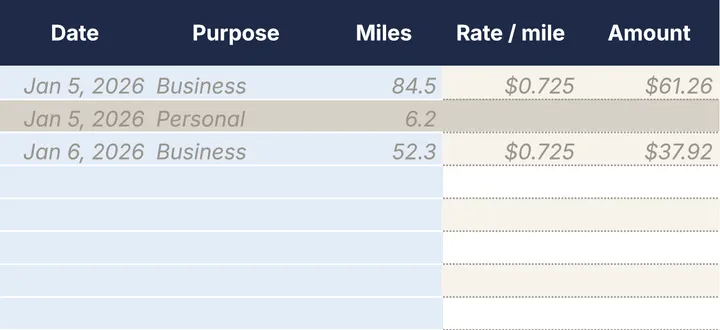
The Log tab of the free 2026 Mileage Log with example rows: date, purpose, miles, rate per mile and amount
The Log tab, with example rows.

We use your email only for these messages. Privacy

  • A Google Sheet for rideshare and delivery drivers, with both 2026 mileage rates
  • Home-to-first-stop miles kept separate
  • One short email before each quarterly tax deadline, and a note when a new template is out
  • Unsubscribe anytime. Works for anyone who drives for work.