Free sheet

Templates

Cleaning Business Tracker · Google Sheets

Who’s due this week.Who still owes you.

Clients, visits, payments, miles and helpers in one Google Sheet, and your year in Schedule C line order. For US house cleaners.

See it on Etsy

One price. No monthly fee.

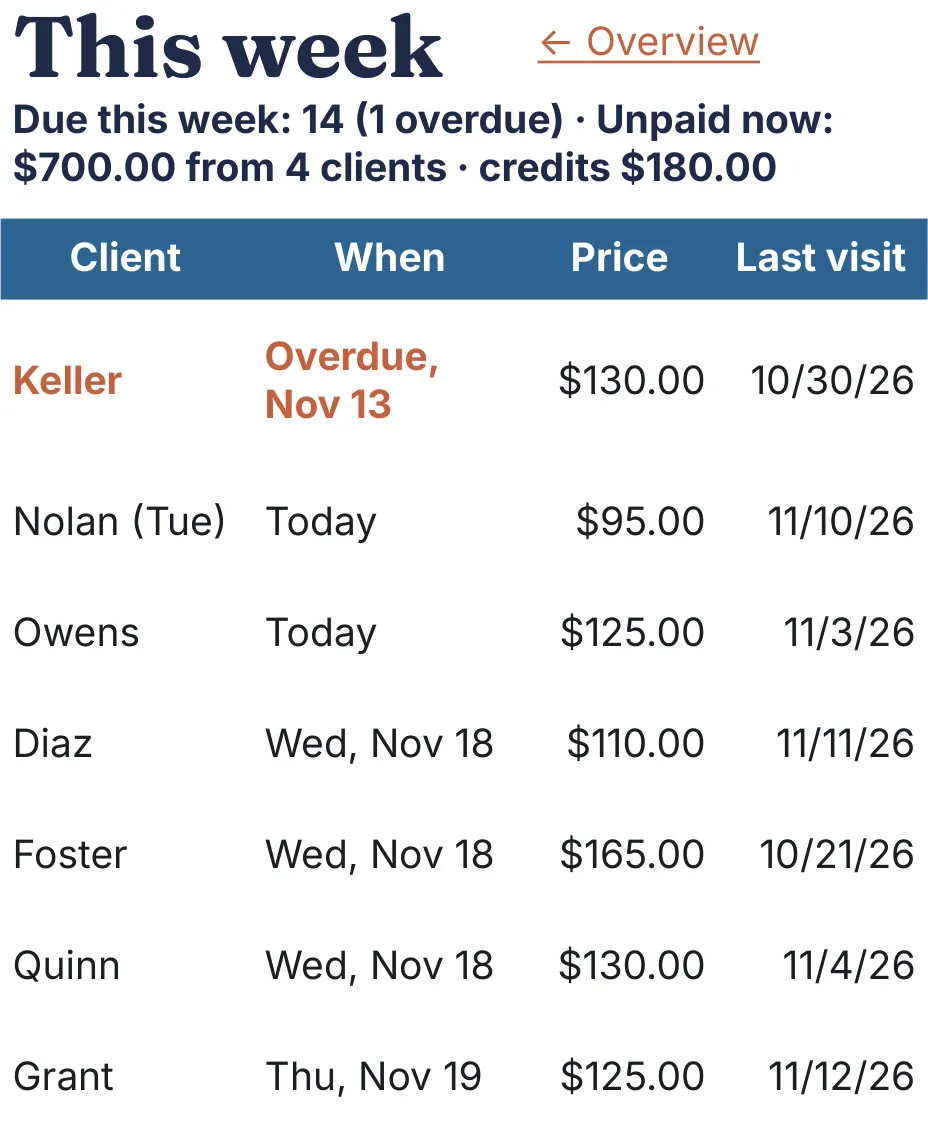
The This week tab with example data - 14 clients due, 1 overdue, $700 unpaid from 4 clients, then each client with the day and the price
The This week tab. Example data, as of Nov 17, 2026.

Open it and see your week

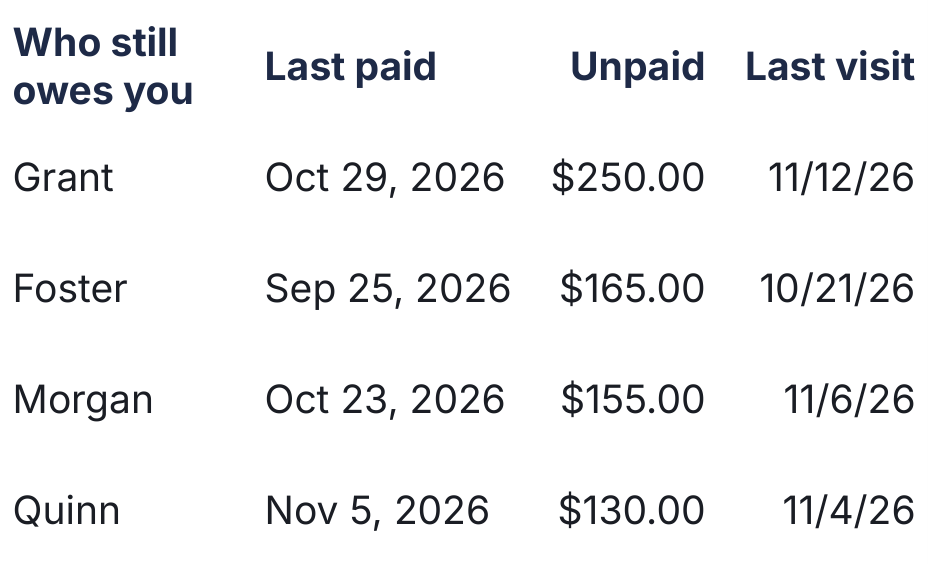
Who is due in the next 7 days, with overdue clients at the top. Under it, who still owes you, largest amount at the top.

  • Type a client’s next visit once. After that it follows your visits.
  • A skipped visit moves the next one on. A cancelled visit stays due.
  • Raising a price? Type the new price and the date it starts. Past visits keep their old price.
  • Use it on its own, or next to a booking app for your payments, miles and expenses.
Who still owes you, with example data - Grant $250, Foster $165, Morgan $155, Quinn $130
Example data · tap to enlarge

Which drives count?

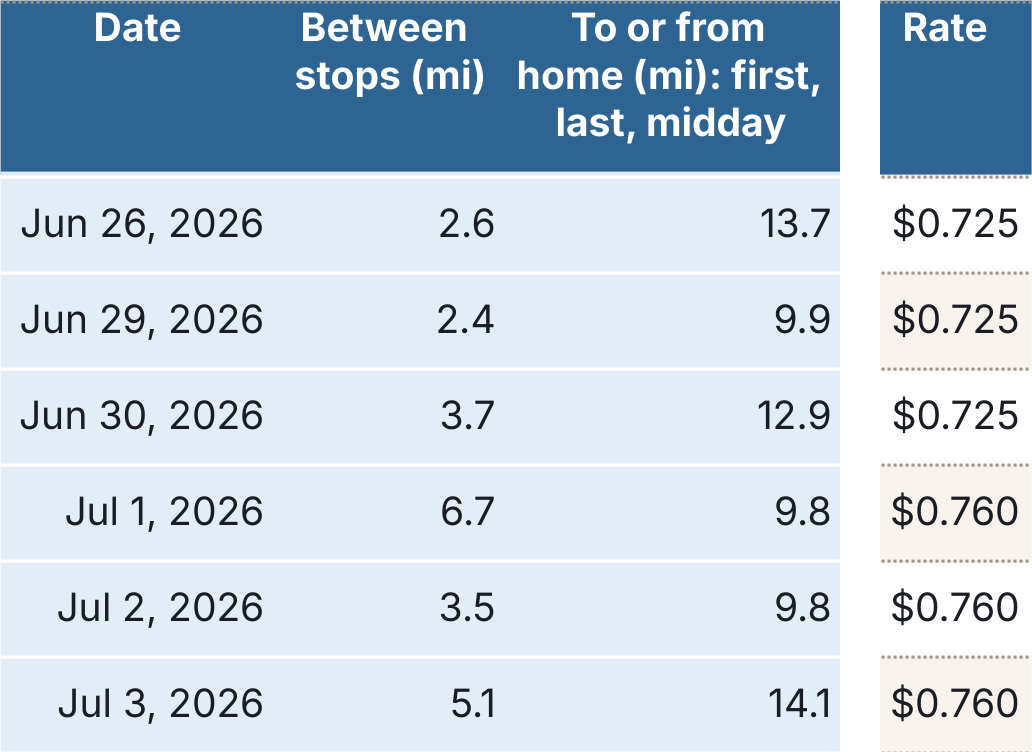
Between clients: yes. Home to the first client and back from the last: usually not, unless your home office is your main place of business. The sheet keeps those drives in their own total, so you have the number either way.

  • One row per work day. The clients on Visits that day show next to your miles.
  • The 2026 IRS rate is picked by date: 72.5¢ a mile through June 30, 2026, and 76¢ from July 1, 2026.
The Miles tab with example data - miles between stops, miles to or from home, and the rate changing from 0.725 to 0.760 on July 1, 2026
Example data · tap to enlarge

What to charge for a visit

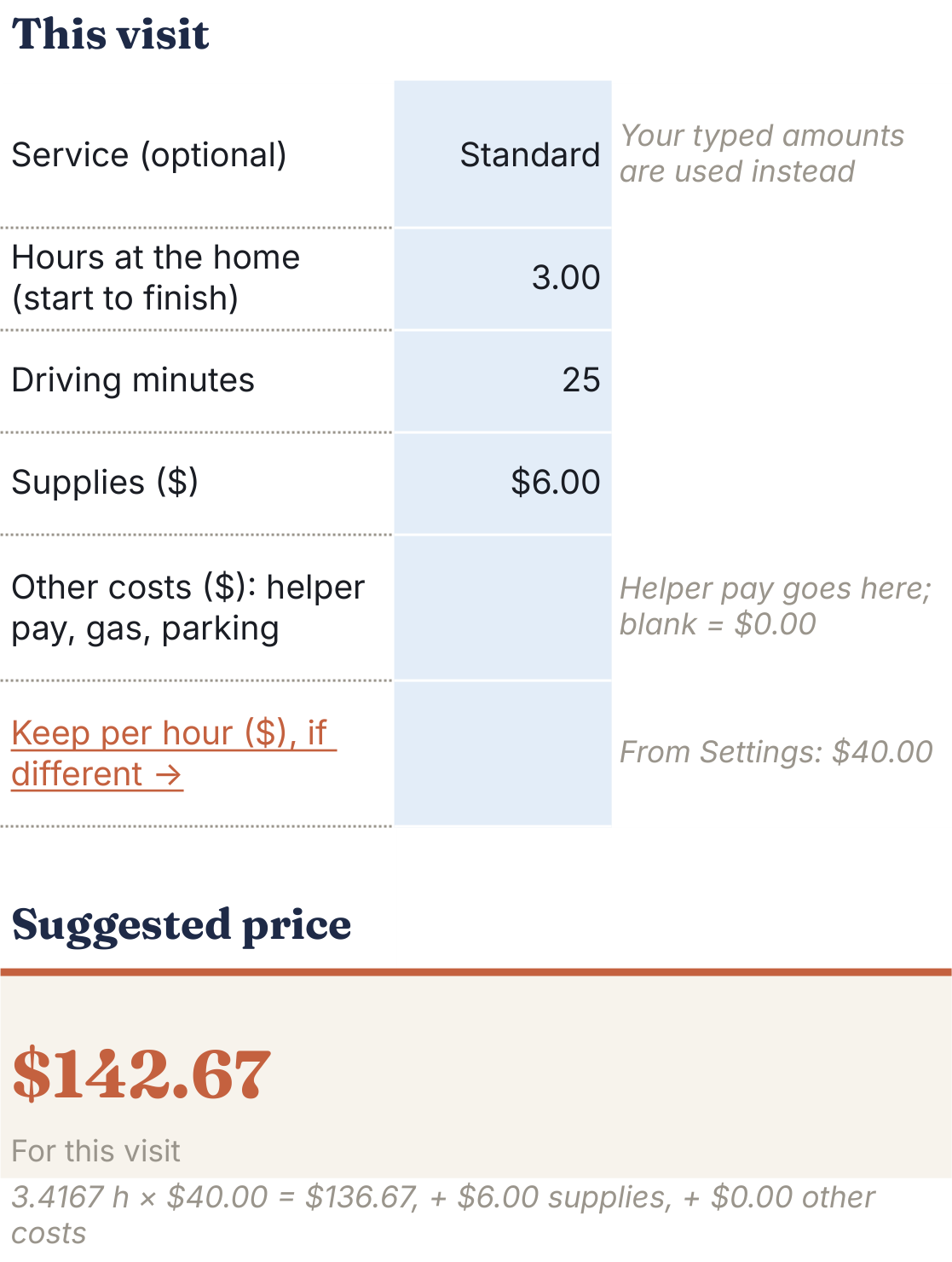
Type your hours, supplies, drive and what you want to keep per hour. See a suggested price and your profit per hour, before yearly costs and taxes. A starting point, you set your price.

The Quote tab with example data - 3 hours, 25 driving minutes, $40 to keep per hour and $6 supplies give a suggested price of $142.67
Example data · tap to enlarge

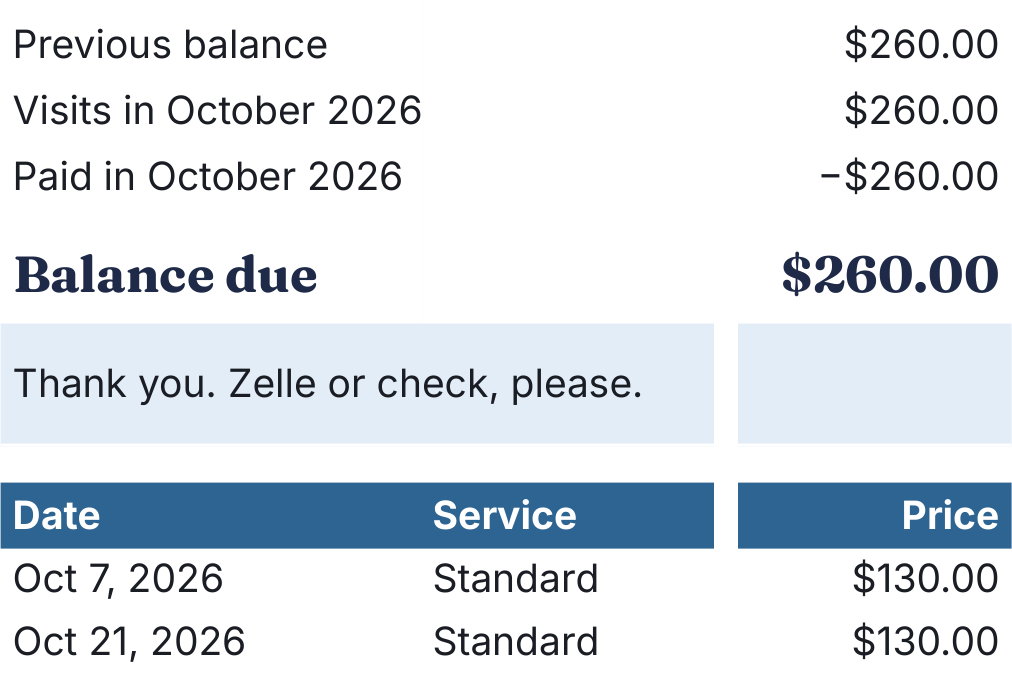
An invoice from your visits

Pick a client and a month. You get the visits, what was paid and the balance due, ready to print or save as a PDF.

The Invoice tab with example data - the lower part of an October invoice, with 2 visits and a balance due of $260
Example data · tap to enlarge

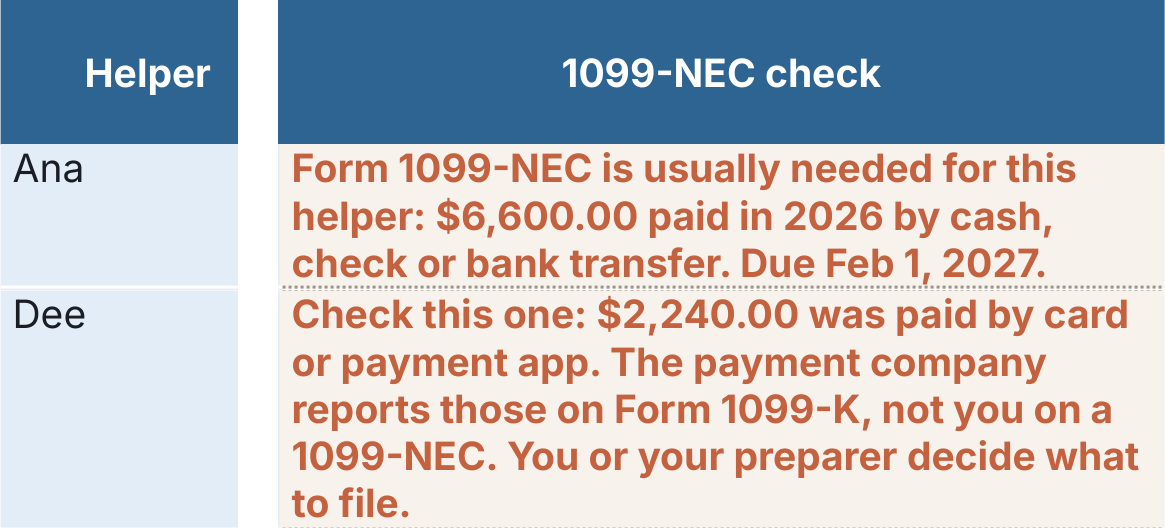
Paid a helper in 2026? It flags the 1099-NEC

Paid a contractor $2,000 or more in 2026? The sheet flags the 1099-NEC, and what you paid before you got the sheet is part of that check.

  • You choose contractor or employee for each helper, with your preparer if you have one.
  • Contractor pay goes on line 11 and wages on line 26. Until you choose, that pay is not counted and the sheet says so.
The Helpers tab with example data - the 1099-NEC check says the form is usually needed for Ana, and asks to check Dee
Example data · tap to enlarge

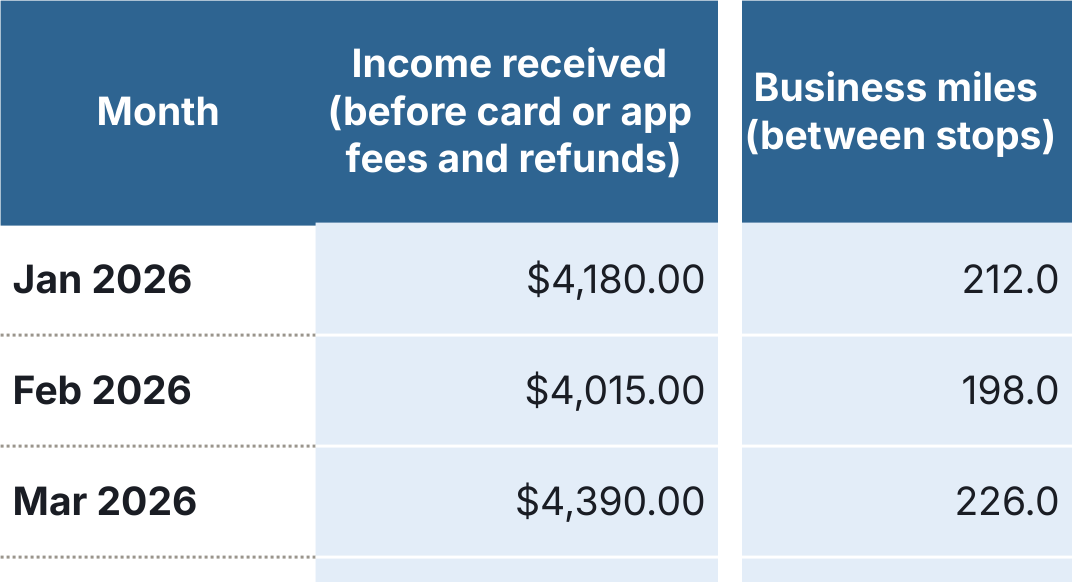
Setting up 2026 late?

One row for each earlier month, and each month’s miles get that month’s rate.

  • A month’s row is a total, not a record of each trip, so keep the records you added it up from.
  • Best done on a computer.
The Earlier months tab with example data - income and business miles for January to March 2026, one row each
Example data · tap to enlarge

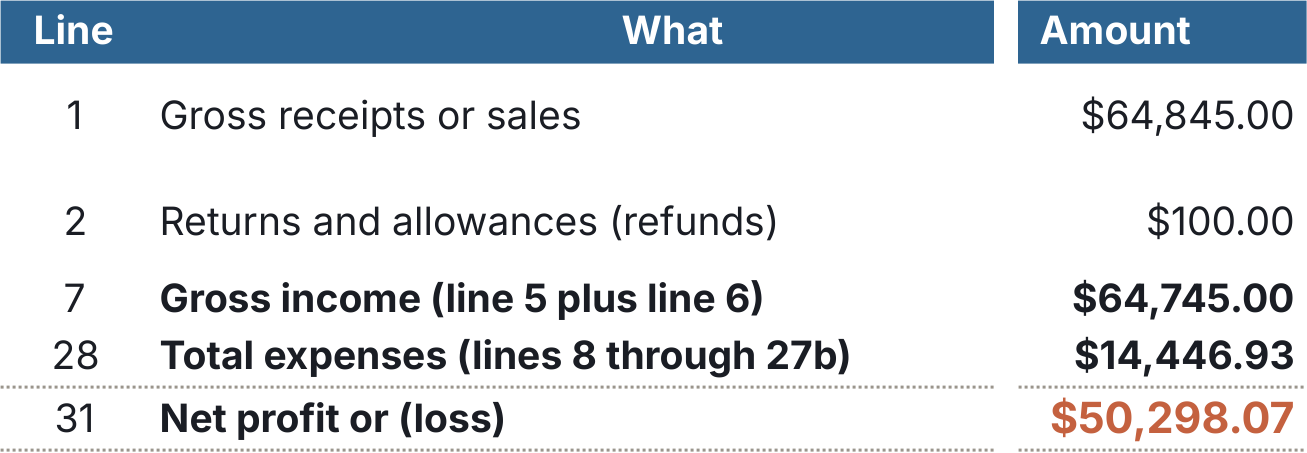
Your year, line by line

Your numbers in Schedule C line order, the car questions (Part IV), and a federal set-aside estimate for each IRS due date.

  • Refunds show on line 2 (returns and allowances). Tips are in line 1, and you see their total.
  • You or your preparer can pick another line for an expense.
The Year tab with example data - Schedule C lines 1, 2, 7, 28 and 31, ending in net profit $50,298.07
Example data · tap to enlarge

Free: House cleaning price calculator

See it on Etsy

What’s inside

Start Here
Three short steps, and the path that fits you: recurring clients, or a booking app.
Overview
Paid this month, unpaid, clients due, net profit, mileage deduction and set-aside so far, with charts by month.
This week
Who is due, and who still owes you.
Clients
Price, how often you clean, next visit, phone, address, and notes such as a gate code or pets.
Visits
A date and a client. Skipped, cancelled, a different price or a deep clean when you need it.
Payments
Cash, check, Zelle or bank transfer, Venmo, PayPal, Cash App or card, with tips in their own column.
Miles
One row per work day, with the IRS rate for the date.
Expenses
Supplies, small tools, insurance, phone, parking and tolls, and more, each with its usual Schedule C line.
Helpers
Contractor or employee, what you paid, and the 1099-NEC check for 2026 payments.
Earlier months
One row for each month before your start day.
Year
Schedule C line order, the car questions, and the set-aside estimate.
Invoice
One client, one month.
Quote
The pricing calculator.
Settings
Business name, tax year, home office answer, the income tax rate you choose, mileage rates and expense lines.


Before you buy

  • Made for Google Sheets. It is not an Excel file.
  • You type or paste your own numbers. Nothing connects to your bank or apps, and it uses no GPS.
  • No online booking, text messages, reminders or team scheduling.
  • No payroll. Helper pay is listed; for employees, payroll is handled outside the sheet.
  • IRS standard mileage rate. If you deduct actual car costs, this sheet does not fit. One car per copy.
  • No supplies inventory, and sales tax is not tracked.
  • Card and app fees are listed but kept out of your totals; Year shows the amount for you or your preparer.
  • Equipment over $2,500 is listed, not in totals: depreciation is yours or your preparer’s.
  • Set-aside is federal, with your own state rate as an option. It does not work out the tips deduction, QBI, credits or penalties.
  • Room for up to 150 clients, 3,000 visits and 3,000 payments. One file covers 2026 and 2027; 2027 miles use the 2027 IRS rate: if your copy does not have it yet, type it in one cell in Settings once the IRS publishes it. Until then they wait.

How you get it

  1. Download the PDF after you buy, and open it in a web browser, not inside the Etsy app.
  2. Sign in to Google (a free account is fine) and click “Make a copy: blank”. The copy is saved in your own Google Drive. “Make a copy: example” opens a made-up year.
  3. Open your copy and begin on the Start Here tab. On a phone, type with the free Google Sheets app.

You get two copies: a blank one for you, and one filled with a made-up year so you can look around.

See it on Etsy

Questions

Can I use it on my phone?

Yes, in the free Google Sheets app (Android or iPhone). A phone’s web browser opens it view-only. Earlier months and pasting are for a computer.

Do I have to log every visit?

No. If a booking app already keeps your schedule, skip This week, Clients, Visits and Invoice, and use Payments, Miles and Expenses.

Does cash count? What about Zelle, Venmo and tips?

Yes. A payment counts in the year you receive it, however it is paid, and tips are part of it. Payments has a column for the method and one for tips.

Is there a monthly fee?

No. One price, and the file is yours, in your own Google Drive.

Will it do my taxes?

No. It keeps your records, puts your numbers in Schedule C line order and estimates what to set aside. Your preparer or your tax software does the return.

An estimate, not tax advice. The sheet files nothing. You or your preparer decide what goes on your return.

See it on Etsy

Free

Get the free 2026 Mileage Log

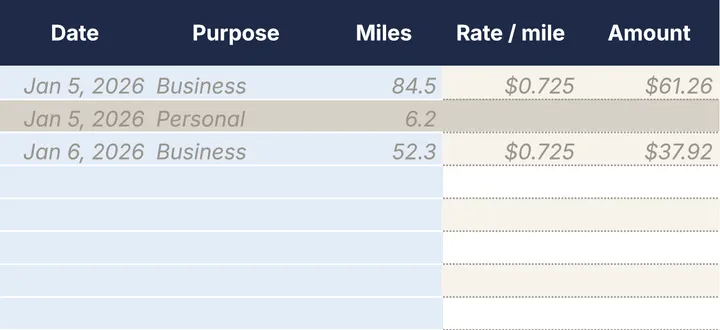
The Log tab of the free 2026 Mileage Log with example rows: date, purpose, miles, rate per mile and amount
The Log tab, with example rows.

We use your email only for these messages. Privacy

  • Free now: the 2026 Mileage Log. Made for rideshare and delivery drivers, works for anyone who drives for work.
  • Home-to-first-stop miles kept separate
  • One short email before each quarterly tax deadline, and a note when a new template is out
  • Unsubscribe anytime.